This blog has moved. Go to SoftwareDevelopmentToday.com for the latest posts.

Monday, December 02, 2013

Use #NoEstimates to create options and deliver value reliably

Why do I use #NoEstimates? Certainly the first reason is obvious in the name of this movement. But there are may other reasons. One of the reasons that does not get enough airtime is that it creates more options than using pre-estimated methods to manage software projects.
Value is unpredictable, generate options to explore the value space

When we estimate a software project we make certain assumptions about what work and how that work will be completed. We need to do that in order to sequence the work, handle the dependencies, assign the work to the right people, etc. Estimation is a process of planning, and as such it requires us to make commitments. Those commitments reduce our options, because we immediately eliminate possible implementation strategies.

Let's look at an example. I want to implement a IT-request queue in my organization. Something that allows us to manage the requests from employees in a way that none is lost and the employee can easily get information on how the item is proceeding through it's life-cycle. A project is started. How to plan this project?

  • The Estimated approach: In this approach I get the team together we list all the work that needs to be completed (database changes, UI for form input, queries and IT ticket management, server deployment, testing, etc.). We schedule this work according to skills and availability of people and end up with a schedule. This schedule will be implemented by different people. Because of this, I will have to follow-up with each person, to make sure we have each necessary task completed before the work on the next tasks begins. This is how we would typically handle the dependencies between these tasks.
  • The #NoEstimates approach: In this approach I ask the team: "What is the most important work that we need to complete NOW?". Tracy says: "The IT ticket handling is the most important part. We can add the customer-side UI later and handle incoming requests by email until then". Bingo! I get the list of tasks for that specific functionality from the team, and it looks much smaller: Database changes + IT UI development. The immediate benefit is that the dependencies are fewer (and we will make them even fewer with User Story splitting), which means less coordination, and valuable functionality delivered earlier. But the key point is this: We have more options! We have made the necessary commitment to deliver something of value, but not made a commitment to the planning for the whole project.

One of the key benefits of using #NoEstimates as a planning approach is that we create more Options, making our projects more valuable and more flexible.

In the #NoEstimates approach we release a partial set of functionality (value) earlier. We may find that for the time being that functionality is enough and may decide not to release any further functionality (an option). Or we may find something we did not know before, and change the project (another option). While in the Estimated approach we will make commitments in terms of time, people and resource allocation that are going to be harder to change later (reducing options), and may commit more money to the problem than we actually need (less options still).

With the #NoEstimates approach we don't commit to requirements that we are not going to immediately work on

Note also that with the #NoEstimates approach we don't commit to requirements that we are not going to immediately work on. The reason is simple: requirements have a "best before" date and expire. We should not commit to requirements too far into the future - but that we will tackle in another post.

Have you applied this planning heuristic in your projects? What were the benefits, and obstacles you faced when using it?

Photo credit: psiaki @ flickr

Labels: , , , , ,

at 07:00 | 3 comments
RSS link

Bookmark and Share

Wednesday, January 25, 2012

Story Points Considered Harmful - Or why the future of estimation is really in our past...

This article is the companion to a talk that myself and @josephpelrine gave at OOP 2012.


We have a lot to learn from our ancestors. One that I want to focus on for this post is Galileo.
Galileo was what we would call today a techie. He loved all things tech and was presented an interesting technology that he could not put down. Through that work he developed optic technology to build first a telescope and later a microscope.
Through the use of the telescope and other approaches he came to realize and defend the Heliocentric view of the universe: the Earth was not the center of the Universe, but rather moved around the Sun.
This discovery caused no controversy until Galileo wrote it down and apparently discredited the view held by the Church at that time. The Church believed and defended that the Universe was neatly organized around the Earth and everything moved around our lanet.
We now know that Galileo was right and that the Church was - as it often tends to be with uncritical beliefs - wrong. We now say obviously the Earth is round and moves around the Sun. Or do we...

The Flat Earth Society

Actually, there are still many people around (curious word, isn't it?) the planet that do not even believe that the Earth is round! Don't believe me? Then check The Flat Earth Society.

The fact that is that even today many people hold uncritical beliefs about how our world really works. Or our projects in the case of this post...

Estimation soup

We've all been exposed to various estimation techniques, in an Agile or traditional project. Here are some that quickly come to mind: Expert Estimation, Consensus Estimation, Function Point Analysis, etc. Then we have cost (as opposed to only time) estimation techniques: COCOMO, SDM, etc. And of course, the topic of this post: Story Point Estimation.
What do all of these techniques have in common? They all look towards the future!
Why is this characteristic important?

The Human condition

This characteristic is nt because looking at the future is always difficult! We humans are very good at anticipating immediate events in the physical world, but in the software world what we estimate is neither immediate, nor does it follow any physical laws that we intuitively understand!
Take the example of a goal-keeper in a football (aka soccer) match. She can easily predict how a simple kick will propel the ball towards the goal, and she can do that with quite a high accuracy (as proven by the typically low scores in today's football games). But even in soccer, if you face a player like Maradona, or Beckham, or Crisitiano Ronaldo it is very difficult to predict the trajectory of the ball. Some physicists have spent considerable amount of time analyzing the trajectory of Beckham's amazing free kicks to try to understand how the ball moves and why. Obviously a goal-keeper does not have the computers or the time to analyze the trajectory of Beckham's free kicks therefore Beckham ends up scoring quite a few goals that way. Even in football, where well-known physics laws always apply it is some times hard to predict the immediate future!
The undisputed fact is that we, humans are very bad at predicting the future.
But that is not all!

This is when things get Complex


Lately, and especially in the agile field we have been finding a new field of study: Complexity Sciences.
A field of study that tries to identify rules that help us navigate a world where even causality (cause and effect) are challenged.
An example may be what you may have heard of, the Butterfly effect: "where a small change at one place in a nonlinear system can result in large differences to a later state".
Complexity Sciences are helping us develop our own understanding of software development based on the theories developed in the last few years.
Scrum being a perfect example of a method that has used Complexity to inspire and justify its approach to many of the common problems we face in Software development.
Scrum has used "self-organization", and "emergence" as concepts in explaining why the Scrum approach works. Here's the problem: there's a catch.

Why did this just happen?


In a complex environment we don’t have discernible causality!
Sometimes this is due to delayed effects from our actions, most often it is so that we attribute causality to events in the past when in fact no cause-effect relationship exists (Retrospective Coherence). But, in the field of estimation this manifests itself in a different way.
In order for us to be able to estimate we need to assume that causality exists (if I ask Tom for the code review, then Helen will be happy with my pro-activeness and give me a bonus. Or will she?) The fact is: in a Complex environment, this basic assumption of the existence of discernible Causality is not valid! Without causality, the very basic assumption that justifies estimation falls flat!

Solving the the lack of internal coherence in Scrum


So, which is it? Do we have a complex environment in software development or not? If we do then we cannot - at the same time - argue for estimation (and build a whole religion on it)! In contrast, if we are not in a complex environment we cannot then claim that Scrum - with it’s focus on solving a problem in the complex domain - can work!
So then, the question for us is: Can this Story Point based estimation be so important to the point of being promoted and publicized in all Scrum literature?
Luckily we have a simple alternative that allows for the existence of a complex environment and solves the same problems that Story Points were designed (but failed to) solve.

The alternative prediction device

The alternative to Story Point estimation is simple: just count the number of Stories you have completed (as in "Done") in the previous iterations. They are the best indicator of future performance! Then use that information to project future progress. Basically, the best predictor of the future is your past performance!
Can it really be that simple? To test this approach I looked at data from different projects and tried to answer a few simple questions

The Experiment

  • Q1: Is there sufficient difference between what Story Points and ’number of items’ measure to say that they don’t measure the same thing?
  • Q2: Which one of the two metrics is more stable? And what does that mean?
  • Q3: Are both metrics close enough so that measuring one (number of items) is equivalent to measuring the other (Story Points)?
I took data from 10 different teams in 10 different projects. I was not involved in any of the projects (I collected data from the teams directly or through requests for data in Agile-related mailing lists). Another point to highlight is that this data came from different size companies as well as different size teams and projects.
And here's what I found:
  • Regarding Question 1: I noticed that there was a stable medium-to-high correlation between the Story Point estimation and the simple count of Stories completed (0,755; 0,83; 0,92; 0,51(!); 0,88; 0,86; 0,70; 0,75; 0,88). With such a high correlation it is likely that both metrics represent a signal of the same underlying information.
  • Regarding Question 2: The normalized data (normalized for Sprint/Iteration length) has similar value of Standard Deviation(equally stable). Leading me to conclude that there is no significant difference in stability of either of the metrics. Although in absolute terms the Story Point estimations vary much more between iterations than the number of completed/Done Stories
  • Regarding Question 3: Both metrics (Story Points completed vs Number of Stories completed) seem to measure the same thing. So...
At this point I was interested in analyzing the claims that justify the use of Story Points, as the data above does not seem to suggest any significant advantage of using Story Points as a metric. So I searched for the published justification for the use of Story Points and found a set of claims in Mike Cohn's book "User Stories Applied" (page 87, first edition):
  • Claim 1: The use of Story points allows us to change our mind whenever we have new information about a story
  • Claim 2: The use of Story points works for both epics and smaller stories
  • Claim 3: The use of Story points doesn’t take a lot of time
  • Claim 4: The use of Story points provides useful information about our progress and the work remaining
  • Claim 5: The use of Story points is tolerant of imprecision in the estimates
  • Claim 6: The use of Story points can be used to plan releases
This these claims hold?

Claim 1: The use of Story points allows us to change our mind whenever we have new information about a story


Although there's no explanation about what "change our mind" means in the book, one can infer that the goal is not to have to spend too much time trying to be right. The reason for this is, of course, that if a story changes the size slightly there's no impact on the Story Point estimate, but what if the story changes size drastically?
Well, at this time you would probably have another estimation session, or you would break down that story into some smaller granularity stories to have a better picture of it's actual size and impact on the project.
On the other hand, if we were to use a simple metric like the number of stories completed we would be able to immediately assess the impact of the new items in the progress for the project.
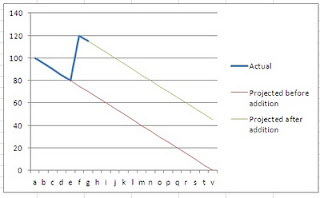
As illustrated in the graph, if we have a certain number of stories to complete (80 in our example) and suddenly some 40 are added to our backlog (breaking down an Epic for example) we can easily see the impact of that in our project progress.
In this case, as we can see from the graph, the impact of a story changing it's meaning or a large story being broken down into smaller stories has an impact on the project and we can see that immediate impact directly in the progress graph.
This leads me to conclude that regarding Claim 1, Story Points offer no advantage over just simply counting the number of items left to be Done.

Claim 2: The use of Story points works for both epics and smaller stories


Allowing for large estimates for items in the backlog (say a 100SP Epic) does help to account in some way for the uncertainty that large pieces of work represent.
However, the same uncertainty exists in any way we may use to measure progress. The fact is that we don’t really know if an Epic (say 100 SPs) is really equivalent to a similar size aggregate of User Stories (say 100 times 1 SP story). Conclusion: there is no significant added information by classifying a story in a 100 SP category which in turn means that calling something an "Epic" is about the same information as classifying it as a 100 Story Points Epic.

Claim 3: The use of Story points doesn’t take a lot of time

Having worked with Story Points for several years this is not my experience. Although some progress has been done by people like Ken Power (at Cisco) with the Silent Grouping technique, the fact that we need such technique should dispute any idea that estimating in SP’s "doesn’t take a lot of time". In fact, as anybody that has tried a non-trivial project knows it can take days of work to estimate the initial backlog for a reasonable size project.

Claim 5: The use of Story points is tolerant of imprecision in the estimates

Although you can argue that this claim holds - even if the book does not explain how - there's no data to justify the belief that Story Points do this better than merely counting the number of Stories Done. In fact, we can argue that counting the number of stories is even more tolerant of imprecisions (see below for more details on this)

Claim 6: Story points can be used to plan releases

Fair enough. On the other hand we can use any estimation technique to do this, so how would Story Points be better in this particular claim than any other estimation technique? Also, as we will see when analysis Claim 4, counting the number of Stories Done (and left to be Done) is a very effective way to plan a release (be patient, the example is coming up).

Claim 4: The use of Story points provides useful information about our progress and the work remaining

This claim holds true if, and only if you have estimated all of your stories in the Backlog and go through the same process for each new story added to the Backlog. Even the stories that will only be developed a few months or even a year later (for long projects) must be estimated! This approach is not very efficient (which in fact contradicts Claim 3).
Basing your progress assessment on the Number of Items completed in each Sprint is faster to calculate (number of items in the PBL / velocity in number of items Done per Sprint = number of Sprints left) and can be used to provide critical information about project progress. Here's a real-life example:

The real-life use of a simpler metric for project progress measurement

In a company I used to work at we had a new product coming to market. It was not a "first-mover" which meant that the barrier to entry was quite high (at least that was the belief from Product Management and Sales).
This meant that significant effort was made to come up with a coherent Product Backlog. The Backlog was reviewed by Sales and Pre-Sales (technical sales) people. All agreed, we really needed to deliver around 140 Stories (not points, Stories) to be able to compete.
As we were not the first in the market we had a tight market window. Failing to meet that window would invalidate the need to enter that market at all.
So, we started the project and in the first Sprint we complete 1 single Story (maybe it was a big story -- truth is I don't remember). Worst, in the same period another 20 stories were added to the Product Backlog. As expected, the Product Management and Sales discovered a few more stories that were really a "must" and could not be left out of the product.
The team was gaining speed and in the second Sprint they got 8 stories to "Done". They were happy. At the same time the Product Manager and the Sales agreed to a cut-down version of the Product Backlog and removed some 20 stories from the Backlog.
After the third sprint the team had achieved velocities of 1 (first Sprint), 8 (second) and 8 (third). The fourth sprint was about to start and the pressure was high on the team and on the Product Manager. During the Sprint planning meeting the team committed to 15 new stories. This was a good number, as a velocity of 15 would make the stakeholders believe that the project could actually deliver the needed product. They would need to keep a velocity of 15 stories per sprint for 11 months. Could they make it?

The climax

As the fourth sprint started I made a bet with the Product Manager. I asked him how many items he believed that the team could complete and he said 15 (just as the team had committed to). I disagreed and said 10. How many items would you have said the team could complete?
I ask this question from the audience every time I tell this story. I get many different answers. Every audience comes up with 42 as a possible answer (to be expected given the crowds I talk to), but most say 8, 10, some may say 15 (very few), some say 2 (very few). The consensus seems to be around 8-10.
At this point I ask the audience why they would say 8-10 instead of 15 as the Product Manager for that team said. Obviously the Product Manager knew the team and the context better, right?
At the end of the fourth sprint the team completed 10 items, which even if it was 20% more than what they had done in previous sprints was still very far from the velocity they needed to make the project a success. The management reflected on the situation and clearly decided that the best decision for the company was to cancel that product.

Story Points Myth: Busted!

That company did that extremely hard decision based on data, not speculation from Project Managers, not based on some bogus estimation using whatever technique. Real data. They looked at the data available to them and decided to cancel the project 10 months before its originally planned release. This project had a team of about 20 people. Canceling the project saved the company 200 man-month of investment in a product they had no hope of getting out of the door!
We avoided a death-march project and were able to focus on other more important products for the company's future. Products that now bring in significant amount of money!

OK, I get your point, but how does that technique work?

Most people will be skeptical at this point (if you've read this far you probably are too). So let me explain how this works out.
Don't estimate the size of a story further than this: when doing Backlog Grooming or Sprint Planning just ask: can this Story be completed in a Sprint by one person? If not, break the story down!
For large projects use a further level of abstraction: Stories fit into Sprints, therefore Epics fit into meta-Sprints (for example: meta-Sprint = 4 Sprints). Ask the same question of Epics that you do of Sprints (can one team implement this Epic in half a meta-Sprint, i.e. 2 Sprints?) and break them down if needed.

By continuously harmonizing the size of the Stories/Epics you are creating a distribution of the sizes around the median:
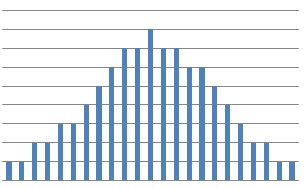

Assuming a normal distribution of the size of the stories means that you can assume that for the purposes of looking at the long term (remember: this only applies on the long term, i.e. more than 3 sprints into the future) estimation/progress of the project, you can assume that all stories are the same size, and can therefore measure progress by measuring the number of items completed per Sprint.

Final words

As with all techniques this one comes with a disclaimer: you may not see the same effects that I report in this post. That's fine. If that is the case please share the data you have with me and I'm happy to look at it.
My aim with this post is to demystify the estimation in Agile projects. The fact is: the data we have available (see above) does not allow us to accept any of the claims by Mike Cohn regarding the use of Story Points as a valid/useful estimation technique, therefore you are better off using a much simpler technique! Let me know if you find an even simpler one!

Oh, and by the way: stop wasting time trying to estimate a never ending Backlog. There's no evidence that that will help you predict the future any better than just counting the number of stories "Done"!

How do I apply #NoEstimates to improve estimation? Here's how...


Photo credit: write_adam @ flickr

Labels: , , , , , , , , , ,

at 11:08 | 54 comments
RSS link

Bookmark and Share

Friday, April 30, 2010

Tired of useless boring planning meetings? Read on, I've got a solution for you


In a meeting today I was graphically reminded of how some of the basic concepts in software development still escape many of us. Case in point, the meaning of capacity.

In many people's minds capacity still means "how many man-hours we have have available for real work". This is plain wrong.

Let's decompose this assumption to see how wrong it is.


  1.  First, in this assumption is implicit that we can estimate exactly how many man-hours we have available for "real work". The theory goes like this: I have 3 people, the sprint is 2 weeks/10 days, so the effort available, and therefore capacity, is 30 man-days. This is plain wrong!!! How? let's see:

    1.  Not all three people will be doing the same work. So, even if you have a theoretical maximum of 30 man-days available not all people can do the same work. If, for example, 1 person would be an analyst, another a programmer and finally the third a tester, then that would leave us with effectively 10 man-days of programming, analysis and testing effort available. Quite different from 30 man-days!
    2. Then there's the issue that not 100% of the time available for each people can actually be used for work. For example, there are meetings about next sprint's content, then there's interruptions, time to go to the toilet... You get the picture. In fact it is impossible to predict how many each person will use for "real" work.

  2. Then there are those pesky things we call "dependencies". Sometimes someone in the team is idle because they depend on someone else (in or out of the team) and can't complete their feature. This leads to unpredictable delays, and therefore ineffective use of the effort available for a Sprint.
  3.  Finally (although other reasons can be found) there's the implicit assumption that even if we could know perfectly the amount of effort available we can know how much some piece work actually takes from beginning to end, in exact terms! This is implicit in how we use the effort numbers by then scheduling features against that available effort. The fact is that we (humans) are very bad at estimating something we have not done before, which is the case in software most of the time.
The main message here is: effort available (e.g. man-hours) is not the same as capacity. Capacity is the metric that tells us how many features a team or a group of teams can deliver in a Sprint, not the available effort!

Implications of this definition of capacity

There are some important implications of the above statement. If we recognize that capacity is closer to the traditional definition of Throughput then we understand that what we need to estimate is not just size of a task, plus effort available. No, it's much more complex than that! We need to estimate the impact of dependencies, errors, meetings, etc. on the utilization of the effort available.

Let me illustrate how complex this problem is. If you want to empty a tank of 10 liters attached to a pipe, you will probably want to know how much water can flow through the pipe in 1 minute (or some similar length of time) and then calculate how long it takes to completely empty the tank. Example: if 1 liter flows through the pipe in 1 minute then it will take 10 minutes to empty a 10 liter tank. Easy, no?

Well, what if you now try to guess the time to empty the same tank but instead of being given the metric that 1 liter of water can flow in the piper for each minute, you are instead given:

  • Diameter of the pipe
  • Material that the pipe is built in
  • Viscosity of the liquid in the tank
  •  Probability of obstacles existing in the pipe that could impede the flow of the liquid
  • Turbulence equations that allow you to calculate flow when in the presence of an obstacle

Get the point? In software we are in the second situation! We are expected to calculate capacity (which is actually throughput) given a huge list of variables! How silly is that?!

For a better planning and estimating framework

The fact is that the solution for the capacity (and therefore planning) problem in software is much, much easier!

Here's a blow by blow description:

  • Collect a list of features for your product (not all, just the ones you really want to work on)
  • With the whole team, assess the features to make sure that neither of them is "huge" (i.e. the team is clueless about what it is or how to implement it). If they are too large, split them in half (literally). Try to get all features to fit into a sprint (without spending a huge effort in this step). 
  • Spend about 3 sprints working on that backlog (it pays off to have shorter sprint!)
  • After 3 sprints look at your velocity (number of features completed in each sprint) and calculate an average
  • Use the average velocity to tell the Product Owner how long it will take to develop the product they want based on the number of Features available in the backlog
  • Update the average expected velocity after each sprint
Does it sound simple? It is. But most importantly, I have done many experiments based on this simple idea, and I'm yet to find a project where this would not apply. Small or big, it worked for all projects where I've been involved in the past.

The theory behind

There's a couple of principles behind this strategy. First, it's clear that if you don't change the team, the technology or any other relevant environmental variable the team will perform at a similar level (with occasional spikes or dips) all the time. Therefore you can use historical velocity information to calculate a long term velocity in the future! 
Second, you still have to estimate, but you do that at the level of one Sprint. The reason is that even if we have the average velocity, an average does not apply to a single sprint but rather to a set of sprints. Therefore you still need to plan your sprint, to identify possible bottlenecks, coordinate work with other people, etc.

The benefits

Finally the benefits. The most important benefit here is that you don't depend on estimations based on unknown assumptions to make your long term plans. You can rely on data. Sure, sometimes the data will be wrong, but compare with the alternative: when was the last time you saw a plan hold up? Data is your friend!
Another benefit is that you don't need to twist anyone's arm to produce the metrics needed (velocity and number of features in backlog), because those metrics are calculated automatically by the simple act of using Scrum.

All in all not a bad proposition and much simpler than working with unavoidably incorrect estimates that leave everybody screaming to be saved by the bell at the end of the planning meeting!

Photo credits:
uggboy @ flickr
johnmcga @ flickr

Labels: , , , , , , , , , ,

at 21:08 | 0 comments
RSS link

Bookmark and Share

Tuesday, April 20, 2010

Setting targets actually decreases your performance. Don't believe me? See this video...

Many of the readers of this blog have probably faced this situation already in the past. When I was adopting Scrum in a local company, I was faced with the tyranny of setting targets. Targets and bonuses were part of that company's HR policies. "This is how we motivate people" as the saying goes.

Now picture this. When we started adopting Scrum we were, as expected, adopting also timeboxed software development (a key part of scrum). But the targets were that we should always be on time (+-10%).

So, get this: you get more money if you are on time (to motivate you to be on time, I guess) but your process is timeboxed! Easy money as they say...

The morale in this story is that targets are useless! If you want to improve the system (R&D for example) you need to manage the system, not set targets!

By adopting Scrum (effectively changing the system) we were able to be 100% on time! And that had nothing to do with the target setting, the system design (using Scrum) was the reason!

This is an insight that many managers don't have today: as manager you must design and manage the system. Setting arbitrary targets and not providing a method (system) is useless!

The video below of a conversation with
John Seddon, is a very good explanation of how targets are useless and even counter productive. I especially loved his points:
1. there's no reliable method for setting a target
2. when you use targets or any other arbitrary measure you drive waste into your system
3. once you learn how to use measures derived from the work, and you involve the people who do the work you achieve a level of performance you would never have set as a target.


Labels: , , , ,

at 21:20 | 0 comments
RSS link

Bookmark and Share

Wednesday, July 08, 2009

A feature team needs more than a cross-functional group!

In a conversation with a friend we identified an anti-pattern that can often happen to "feature teams".

Feature teams are supposed to be cross-functional groups that focus the software development process in valuable-chunks of work, which normally cross the whole system (vertical slices of the system).[1]

There's a way in which you can meet that definition and still not be a feature team. Here's the example.

In a certain company, that shall go unnamed, one feature team was developing their features all through the project. At the same time a set of UI designers were developing their version of what would be a new user interface for the product. Come the last Sprint of the project and the UI people gave the complete UI specification to the feature team. Lots of changes were needed.

At that point the feature team was struggling to develop all of the new screens defined by the UI people as well as changing the ones that were already implemented.

On the face of it, the feature team was working like a feature team. It had UI people, architects, testers and engineers that worked together daily to develop and deliver complete features at the end of every sprint. It was the proverbial cross-functional team. However there was a problem. That's when it hit me the feature team definition has been wrong all along! A feature team is not defined by it's structure it is defined by it's output!

This particular team had no way to create a complete output of the product, they were powerless to influence what the UI team would work on and could only wait and cross their fingers that the UI team would not ask them to completely re-implement the product in the last sprint.

Note that the feature team had UI people present in the planning and development of each feature they developed, but there was another UI team working in a different organization that was shielded from the development work.

Also, the feature team could deliver so called features in every sprint, so by the "old" definition they were indeed a feature team; except their were not.

Note that this same problem could happen if, instead of UI team, you talk about Marketing, IT, Sales, Localization, Documentation, Certification testing, etc.

A feature team is not defined by it's structure (being cross-functional), it's defined by it's output! (delivering shippable pieces of the system)

Proposal for a new definition of Feature Team


So here's a proposal for an improved definition of a feature team:
A feature team is a long-lived group of people that typically involves engineering and non-engineering functions and delivers a complete and potentially shippable feature at the end of every Sprint.
A Feature Team may, as needed, include roles such as: UI designers, UX testers, IT personnel, Marketing, Sales. A feature team will in any case involve all roles that influence the development of a feature to the point of being shippable.


[1] Scaling Lean and Agile Development, Larman, Vodde: Feature team definition on page 153

Labels: , , , , ,

at 15:10 | 4 comments
RSS link

Bookmark and Share

Sunday, December 14, 2008

Estimation is needed but useless. Do it and throw away the numbers!

I've discussed this idea a few times with some friends, but I'll concede that the ultimate argument for stopping to estimate altogether is still to come...

In the meanwhile here is more food for thought.
Rob Bowley argues why estimations are bad in software development.

My favorite part of his presentation:
[In a study discussed in Peopleware by Lister and De Marco, it was found that "the highest [software development] average productivity was on those projects that didn’t estimate at all."

Labels: , , , ,

at 23:35 | 1 comments
RSS link

Bookmark and Share

Thursday, October 23, 2008

What is Velocity? (in agile software development)

Velocity is a term used in agile software development to illustrate the "rate of progress" for a team or a set of teams (i.e. a project/program).

The simplest way to define velocity is: the number or user stories a team/project can do in one sprint ("do" here means that it really is done and potentially ready to ship).

Without the use of velocity you would not be able to draw your teams's burndown, as velocity is the slope of the burndown curve, i.e. how fast are you burning down the stories (or story points or hours) that you committed to for the ongoing sprint.
At a project/progam level, velocity is the rate at which the whole project is burning the User Stories (or requirements) from the backlog.

Also, without knowing your team/project's velocity you can not make longer term planning (over 1 sprint) or even release planning. Hence the importance of knowing your velocity!

In the first 1 or 2 sprints that you run, you will have to estimate your team/project's velocity as you don't have enough data to project your past performance into the future. However, after 3-4 sprints you should start using an average of your past velocity to plan the future and update the release plan.

Note that velocity is a range, not an exact number. For example, if you have developed 2, 5 and 4 stories respectively in your past 3 sprints, then you know that your velocity is 2-5, not 3 or 4. This range will allow you to communicate your best case scenario and your worst case scenario to your stakeholders instead of committing to one single number that is most likely wrong. Always use velocity as a range when communicating outside your team.

In short, velocity is how fast you are developing your software.

Some more resources:
An extensive example and definition of velocity.
A simple definition of velocity:
The mathematical definition of velocity (from Physics).

My thinking on velocity and Agile Estimation has evolved

If you want to know what I have learned since I wrote this article, check out my #NoEstimates white paper and the following articles:

Labels: , , , , , , , ,

at 10:00 | 8 comments
RSS link

Bookmark and Share

Monday, September 22, 2008

Testers are developers! Stop breaking them apart

First one clarification. Testing is needed, required, critical and very much a MUST. With that out of the way let's go to the post.

Many people have mentioned the need to include testers in Scrum or agile, and planning your processes with a testing step somewhere (normally close to the end).

All of these ideas are OK. There's nothing wrong with testing, the problem is that testing is done too late. Would you buy a car which engine was "fixed" after it came out of the line and didn't start? -- I certainly wouldn't not!

In software, like in cars, problems should be found early, very early. In fact problems should be found so early that they never reach the (needed) testing phase at the end (of the day preferably). This is why we need to stop thinking about testing as something separate from development or even coding. Testing must be part of every step of the process.

I don't agree with the proposal in
this article. The tester should not be the one developing the test cases in isolation, and certainly not after the team has planned! The reason is that the tester will find faulty assumptions and possible design problems while thinking about the test cases. That information is crucial for the team to avoid building problems into the software.

Testers should be involved from the start. In fact, for each story that the team is planning in the sprint planning meeting, they should at the same time plan the test cases, review the initial assumptions and only after that should they actually plan the tasks to accomplish that story.

The best way to develop quality software is not to test the bugs out, it is to develop quality in -- this is why testers should be involved in every step of the process (Scrum in this example).

As Deming said:
Build quality in, don't inspect quality in.


Oh and by the way, if the test cases are (really) written why would the coder wait for the tester to verify that his code change works? -- Just run the tests immediately! It seems to be that the coder not running the tests herself is just a way to avoid feedback, which is key to Agile!

Labels: , , , , ,

at 02:50 | 0 comments
RSS link

Bookmark and Share

Sunday, August 10, 2008

Great description of Agile planning sessions

Lasse has written a great post on estimation using the Story Point concept and the Planning poker practice.
Some time ago I also wrote a post on how to make these Planning Poker sessions timeboxed but still effective. If you are interested in estimation and planning in Agile Software Development these posts are worth a read.

Got some more posts, papers or articles about agile estimation and planning? Link them below!

Labels: , , , ,

at 14:14 | 0 comments
RSS link

Bookmark and Share

The value Black Swan (or the killer improvement in software development)

Thinking back to how we value our work, we must recognize that, in software, quantity is not value!

The number of things we do in a sprint
does not vary too much, we can consider it a Gaussian (assuming correct and consistent measurement) -- or in Black Swan (TBS) parlance: velocity is a variable from Mediocristan. However, the value of each item does not follow a Gaussian -- in Black Swan parlance value per item is a variable from Extremistan. It is conceivable to think that we can have one item that accounts for 90% of the value we deliver, in fact that is most often the case, but even knowing this we may underestimate (or lack understanding of) the real extreme value of an item.

What does that mean in practice? How does this affect our planning or item selection? Can we in anyway predict the value? (not, according to TBS).... The payoff of a "large value" item would however be much bigger! (altavista vs Google)

In my view, given the current knowledge I have of the software development process/world, I'd say that this assertion means that the most value in a software development process can be obtained by concentrating on selecting those extreme value items that can make the software a success. Current science and practice on this, however, seems to lack any repeatability or reliability when it comes to reliably selecting the "killer" features... Do you have any links to papers/articles about value focus in the requirements selection process? link them up in the comments section.

PS: if you don't know what a Black Swan is, you better read this, or the book.

Labels: , , , , , , , , ,

at 13:15 | 0 comments
RSS link

Bookmark and Share

Friday, April 18, 2008

End the never ending design discussions: Timeboxed estimation for User Stories, a pattern in Agile adoption

In
this post, Jason explains one common problem with the estimation and planning sessions in Agile teams. The problem he describes however, is quite common and has lead to implementation of the Separate Design and Requirements anti-pattern in the traditional software development world.
So I thought I'd write a pattern about a simple and common solution that I've seen and applied to solve that problem.

Timeboxed User Story estimation

Problem:

In the first part of the planning meeting the Scrum team and the Product Owner will review the top User Stories in the backlog to make sure the team and the Product Owner share the same understanding of each User Story.
In the second part of the planning meeting the team will do a short design discussion for each of the items. The discussion should be around what needs to get done for each User Story in order to collect Meaningful Tasks and make the work clear to the whole team.
When the team gets to the definition of meaningful tasks they will get stuck in design discussions often spending too much time in the first one or two stories and then not having a complete decomposition of the other User Stories that would organize the sprint for the team.
Some consequences of this problem are:
  • missed tasks in the sprint backlog that end up not being done;
  • mis-understanding of the User Story design that leads to inconsistent design decisions;
  • unclear definition of the design for a User Story that leads to inconsistent and sometime incompatible architectural patterns in components that need to interact (especially when in the presence of Component Teams);
  • Cowboy Coding.

Context:

This pattern is applicable in the context of the planning meeting, but can be used also when reviewing a Product Backlog before the planning meeting (see Prepared Product Backlog).
The same pattern can be used to estimate any attribute of a task, such as effort, risk or business value.
In order for this pattern to be applied the team needs to agree to use the same technique. Sometimes some of the team members will refuse to use this practice by stating that it is not "serious" enough or challenging it's credibility. Alternatively people can say that with this method we cannot get "good" design, however it is important to point out that the aim of the planning meeting is not to set the "final" design, but rather the first iteration of the design and especially to achieve consensus with the team on the design patterns and architectural approaches selected. The design, as well as the product, should evolve during the sprint.
In my experience this technique can be successfully used in teams of up to 10 people during the planning meeting.

Solution

The solution is to time-box the estimation for every single User Story, not just for the meeting. Note that the team needs to agree how much time they will spend for each item they accepted for the sprint that is starting. We have used 5 minute time boxes for development stories and 2 minutes for management-related stories.
At the start of the meeting the team agrees on the size of the time box in such a way that it allows to cover all the stories needed within the length of the meeting. For example, if you have 10 stories to cover and 60 minutes meeting that means that after 5 minutes you need to move to the next story (that will give you a 10 minute buffer).
The process for each story is:
  1. The facilitator reads the story from the product backlog
  2. The teams ask questions or define tasks by talking about the design of the implementation
    • Example questions are: what modules will this story touch?; do we need help from any other team?; do we already have module X in our version control?; do we have the design for the UI?; will we need to manually test this feature or is it enough to have the automated user acceptance tests?; etc.
  3. While the team discusses the needed design changes/additions the facilitator writes down the clear tasks (example: refactor class X, change the algorithm for Y, design a view for Z, get support from the DB admin for the DB upgrade in the test environment, etc.)
    • For some tasks to be clear, the facilitator may need to ask clarifying questions. See step 2 for examples.
  4. At 4 minutes (if the timebox is 5 minutes), the facilitator will request everybody to estimate the story (using the Planning Poker method for example).
  5. If there is no consensus on the estimation, the discussion continues
    • At this time the facilitator can focus the discussion by asking the highest and lowest estimate person: "Why do you think that is the case?"
  6. At 5 minutes the facilitator will ask everybody to estimate the story and note down the most popular estimate value
  7. The facilitator closes the estimation for this story. Return to step 1.
After the meeting the team has a preliminary list of tasks (that will be improved during the sprint) and a consensus on some basic, yet critical design/architectural decisions.
Even if this method seems "minimalist", our experience is that it works well-enough even for 4 week sprints. Although, due to the size of the tasks it is easier to apply to 2 week sprints.

Resulting context

  • The first few times the team will try this technique their discussion may be very superficial, especially if the team has never had design discussions in short spurts before. This is to be expected and the experienced ScrumMaster will keep her ears open for symptoms of this during the daily meetings and call for additional design discussions during the sprint, when needed.
  • The first few times the team may feel that the process is "artificially" strict. This is a common critique. However the team should stick to the practice for at least 4 sprints before changing it or "customizing" it. Our experience is that people will adapt to the method and, after some sprints, start producing high-quality high-level design already during the short discussions in the planning meeting.
  • If the first part of the planning meeting was not enough to clarify the aim of each of the stories to be estimated the team may have to discuss the stories from the requirements perspective before they can have a design conversation. In this case the facilitator should stop the discussion and defer the estimation of that task to when the Product Owner has explained well enough the story (this is the Unclear Stories anti-pattern).

See Also (patterns and anti-patterns not defined yet):

  • User Stories for communication across functions
  • Meaningful tasks
  • Component teams (anti-pattern)
  • Cowboy coding (anti-pattern)
  • Unclear stories (anti-pattern)
  • Prepared product backlog

Resources

A good practice for the actual estimation is the "planning poker game". Here are some resources:

Labels: , , , , , , , , , , , , ,

at 19:10 | 2 comments
RSS link

Bookmark and Share

 
(c) All rights reserved