This blog has moved. Go to SoftwareDevelopmentToday.com for the latest posts.

Monday, September 08, 2014

How to create a knowledge worker Gemba

I am a big fan of the work by Jim Benson and Tonianne Barry ever since I read their book: Personal Kanban.

In this article Jim describes an idea that I would like to highlight and expand. He says: we need a knowledge worker Gemba. He goes on to describe how to create that Gemba:

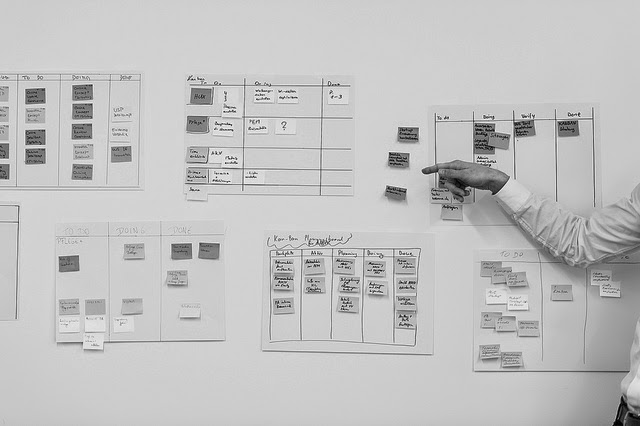
  • Create a workcell for knowledge work: Where you can actually observe the team work and interact
  • Make work explicit: Without being able to visualize the work in progress, you will not be able to understand the impact of certain dynamics between the team members. Also, you will miss the necessary information that will allow you to understand the obstacles to flow in the team - what prevents value from being delivered.

These are just some steps you can take right now to understand deeply how work gets done in your team, your organization or by yourself if you are an independent knowledge worker. This understanding, in turn will help you define concrete changes to the way work gets done in a way that can be measured and understood.

I've tried the same idea for my own work and described it here. How about you? What have you tried to implement to create visibility and understanding in your work?

Labels: , , , , , , , , ,

at 06:00 | 0 comments
RSS link

Bookmark and Share

Tuesday, April 22, 2008

An inconvenient truth, in work management

I bet anyone in my position (Agile Coach) has faced this before: you present a work method to a team or a person (be it scrum, XP, DSDM, FDD, etc.) and they go "yeah, I see what you mean, but that would never work here".

If I only had a dime for every time I heard that I could be rich!

Today it happen again. Here I am presenting the
Personal Scrum work method. People are following, they are asking some good questions and at some point it hits: "Yeah, I see what you mean and it makes sense, but that would never work for us. We have too much work we cannot predict because we want to have a very fast turnaround for our customers (1 business day) and that's why we cannot really plan our weeks that way. On top of it we are too busy to spend that much time (1-2 hours/week) planning what to do."

Now, for most of you (if not all) the problems in this phrase/quote are quite transparent, but for the person saying it, it was not. They did not understand some of the basic principles of work/time management and productivity:
  1. If you cannot allocate your whole week because some portion of it will be "unpredictable" (have you heard of maintenance in production software?) then you don't allocate the full week to planned work! That's not a reason not to plan... Just estimate how much time you need for "unexpected" items (and that tends to be pretty regular from week to week), and plan the rest of the time!
  2. If you are too busy, then how do you know your are doing the most important things for your stakeholders/customers? Are you setting aside the time to think through the priorities of your work from your customer/stakeholder's perspective? If not then I'm sure they'll be mad at you or at least disappointed -- even if you are busy!
  3. If you are too busy (yes, again), that means you are "thrashing". This means: you have started many threads of work but are getting none of it done! Remember that only work that is "done" counts. Starting something you don't finish does not count (unless your manager/supervisor is clueless, in which case it is time to search for a new job anyway). Search for the ZEN of getting things to "done".
  4. Work is work. Stating that a method (whatever that method is, take GTD for example) does not apply to manage your work can only be a result of not understanding the basic essence of any piece of work: 1) you get an order with some information and possibly inputs; 2) then you process it, alone or with a team; 3) finally you finish the work (as in "done"). This is true for every piece of work that needs to get done, whether it is planting potatoes or designing a piece of software, and certainly writing a business proposal or answering an RFP. If you don't understand that basic attribute of work there's a deeper problem we need to address. Managing the work is the least of my worries when I face this type of situation.
Now, all of these observations could have been done by anyone with experience in trying to manage work. But (and this is the sad fact) there's not too many people out there that understand the concept of "managing one's (or one's team) work". Sigh...
This brings back memories of a conversation I had with a senior and well known Scrum trainer/guru when he was training at our company:
In the CSM training, after the "promise" game exercise he was looking down and gloomy. I walked up to him and asked what was the matter. He turned and said: "see, this (the problems uncovered by the "promise" game) is what I see in all companies I visit, and that just makes me feel sad about the state of our industry. See, what I'm trying to do is just make our industry better, more professional".

Indeed, better and more professional. That's the right goal!

Labels: , , , , , , , ,

at 22:13 | 0 comments
RSS link

Bookmark and Share

Friday, April 18, 2008

End the never ending design discussions: Timeboxed estimation for User Stories, a pattern in Agile adoption

In
this post, Jason explains one common problem with the estimation and planning sessions in Agile teams. The problem he describes however, is quite common and has lead to implementation of the Separate Design and Requirements anti-pattern in the traditional software development world.
So I thought I'd write a pattern about a simple and common solution that I've seen and applied to solve that problem.

Timeboxed User Story estimation

Problem:

In the first part of the planning meeting the Scrum team and the Product Owner will review the top User Stories in the backlog to make sure the team and the Product Owner share the same understanding of each User Story.
In the second part of the planning meeting the team will do a short design discussion for each of the items. The discussion should be around what needs to get done for each User Story in order to collect Meaningful Tasks and make the work clear to the whole team.
When the team gets to the definition of meaningful tasks they will get stuck in design discussions often spending too much time in the first one or two stories and then not having a complete decomposition of the other User Stories that would organize the sprint for the team.
Some consequences of this problem are:
  • missed tasks in the sprint backlog that end up not being done;
  • mis-understanding of the User Story design that leads to inconsistent design decisions;
  • unclear definition of the design for a User Story that leads to inconsistent and sometime incompatible architectural patterns in components that need to interact (especially when in the presence of Component Teams);
  • Cowboy Coding.

Context:

This pattern is applicable in the context of the planning meeting, but can be used also when reviewing a Product Backlog before the planning meeting (see Prepared Product Backlog).
The same pattern can be used to estimate any attribute of a task, such as effort, risk or business value.
In order for this pattern to be applied the team needs to agree to use the same technique. Sometimes some of the team members will refuse to use this practice by stating that it is not "serious" enough or challenging it's credibility. Alternatively people can say that with this method we cannot get "good" design, however it is important to point out that the aim of the planning meeting is not to set the "final" design, but rather the first iteration of the design and especially to achieve consensus with the team on the design patterns and architectural approaches selected. The design, as well as the product, should evolve during the sprint.
In my experience this technique can be successfully used in teams of up to 10 people during the planning meeting.

Solution

The solution is to time-box the estimation for every single User Story, not just for the meeting. Note that the team needs to agree how much time they will spend for each item they accepted for the sprint that is starting. We have used 5 minute time boxes for development stories and 2 minutes for management-related stories.
At the start of the meeting the team agrees on the size of the time box in such a way that it allows to cover all the stories needed within the length of the meeting. For example, if you have 10 stories to cover and 60 minutes meeting that means that after 5 minutes you need to move to the next story (that will give you a 10 minute buffer).
The process for each story is:
  1. The facilitator reads the story from the product backlog
  2. The teams ask questions or define tasks by talking about the design of the implementation
    • Example questions are: what modules will this story touch?; do we need help from any other team?; do we already have module X in our version control?; do we have the design for the UI?; will we need to manually test this feature or is it enough to have the automated user acceptance tests?; etc.
  3. While the team discusses the needed design changes/additions the facilitator writes down the clear tasks (example: refactor class X, change the algorithm for Y, design a view for Z, get support from the DB admin for the DB upgrade in the test environment, etc.)
    • For some tasks to be clear, the facilitator may need to ask clarifying questions. See step 2 for examples.
  4. At 4 minutes (if the timebox is 5 minutes), the facilitator will request everybody to estimate the story (using the Planning Poker method for example).
  5. If there is no consensus on the estimation, the discussion continues
    • At this time the facilitator can focus the discussion by asking the highest and lowest estimate person: "Why do you think that is the case?"
  6. At 5 minutes the facilitator will ask everybody to estimate the story and note down the most popular estimate value
  7. The facilitator closes the estimation for this story. Return to step 1.
After the meeting the team has a preliminary list of tasks (that will be improved during the sprint) and a consensus on some basic, yet critical design/architectural decisions.
Even if this method seems "minimalist", our experience is that it works well-enough even for 4 week sprints. Although, due to the size of the tasks it is easier to apply to 2 week sprints.

Resulting context

  • The first few times the team will try this technique their discussion may be very superficial, especially if the team has never had design discussions in short spurts before. This is to be expected and the experienced ScrumMaster will keep her ears open for symptoms of this during the daily meetings and call for additional design discussions during the sprint, when needed.
  • The first few times the team may feel that the process is "artificially" strict. This is a common critique. However the team should stick to the practice for at least 4 sprints before changing it or "customizing" it. Our experience is that people will adapt to the method and, after some sprints, start producing high-quality high-level design already during the short discussions in the planning meeting.
  • If the first part of the planning meeting was not enough to clarify the aim of each of the stories to be estimated the team may have to discuss the stories from the requirements perspective before they can have a design conversation. In this case the facilitator should stop the discussion and defer the estimation of that task to when the Product Owner has explained well enough the story (this is the Unclear Stories anti-pattern).

See Also (patterns and anti-patterns not defined yet):

  • User Stories for communication across functions
  • Meaningful tasks
  • Component teams (anti-pattern)
  • Cowboy coding (anti-pattern)
  • Unclear stories (anti-pattern)
  • Prepared product backlog

Resources

A good practice for the actual estimation is the "planning poker game". Here are some resources:

Labels: , , , , , , , , , , , , ,

at 19:10 | 2 comments
RSS link

Bookmark and Share

Tuesday, April 08, 2008

Personal Scrum or Work 2.0


So, I've been inflicting Scrum on myself.

This is my "eat your own dog food" because I'm an Agile Coach at the company where I work, which in practice means that I try to work with teams and help them with Agile adoption, and in some cases with the Agile development.

For me to preach Scrum and not do it would be at least incoherent, but I can think of even less nice ways to put it.

So, back to the story. I'm using Scrum patterns for managing my own work. Let me explain this a little bit. I'm following a method for the management of my personal work that resembles and is largely based on the patterns that we see in Scrum.

Here's the key points of how it works:
  1. I have the weekly planning (yes, I'm using weekly iterations/sprints) every week on Monday morning. This is where I look at my backlog (personal and team) and the list of meetings for the week and I plan what I will be doing that week. The weekly plan I put on the wall with post-its.
  2. Every day in the morning (before opening Outlook) I read my task board on the wall and list for myself what I wil try to accomplish during that day (only that day). This becomes my "daily plan" for the work to be done. And the fact that I review the plan daily also helps me to
  3. On Friday I finalize my sprint, do the personal retrospective and review if there's something from that retrospective that I want to add to my Backlog.
There are more details to this, but these are the key points. I'll write about the details later.
The Scrum patterns applied with the above items are:
  • The planning day (point 1 above), which in my case is a planning hour (it takes between 45 min and 1,5 hours)
  • The daily check (point 2), which is my review of the task board in the morning and the resulting "daily plan"
  • The retrospective (point 3). Where I analyze my work week and collect "TRY" items (as in Cockburn's retrospective agenda) that I will implement during next week.
This way I stay familiar with the mechanics of Scrum (not all, but the key points) and have a method for managing my own personal work.

The results have been good. I've developed the concept of personal capacity (velocity in XP), which tells me what I can commit to and gives me a good way to communicate with my stakeholders about what I can and cannot accomplish in one week of work.

As a result of knowing my capacity I can now be proactive and manage the "pipe" of work for the next few weeks (I'm keeping a backlog of three weeks for short term actions in a limited queue: credit for Mary Poppendieck for bringing that up in the training at our company).

Maintaining the limited queue for the next 3 weeks in turn helps me not just avoid over committing to work during the ongoing week, but hopefully also for the next three weeks.

The biggest value I get out of the system though, is that now I really am in control of my work and can make informed decisions constantly. I have a proper time management system in place!

This method I call Personal Scrum, when used to manage my personal work, or Management (as in Work Management) Scrum, when used to manage the work of a management team.

Labels: , , , , , ,

at 19:53 | 7 comments
RSS link

Bookmark and Share

Wednesday, March 19, 2008

Busy vs. Productive, which one are you?

Eye-opening piece about the biggest cliché in the work-world: Work smarter not harder (or longer).

Do you see yourself in this?
Busy-ness is impressive. It puts you in the heat of the action. It gives you an elevated sense of importance. You’re always late for social engagements, barely have enough time for family get-togethers, and hardly get a moment’s sleep. Emails get exchanged, meetings fill up your schedule, worldwide teleconferences become the norm–there’s even the occasional hope of revenue exceeding expenses. You’re like a rock star without the music.
The problem is that working smarter takes a lot of mental effort. Constant prioritizing, not answering e-mails when they come, but when you are ready to answer them, stopping to think about the long term and planning your present based on that.

In the spirit of gaining control over my work-week I've started using a process based on Scrum, I call this process Personal Scrum. I'll post some details of that over the next few weeks. It would be really good to get your input on what techniques you are using to manager your personal work-time. Let the community know by adding a comment to this post.

As for working smarter... try it out, it may even work for you. It certainly does for me.
Blogged with the Flock Browser

Labels: , , ,

at 20:01 | 0 comments
RSS link

Bookmark and Share

 
(c) All rights reserved